Status Codes🔗
Device Provisioning Status🔗
Various colors are used to represent different provisioning states of network switches. Each state is paired with a specific color code (hex value).
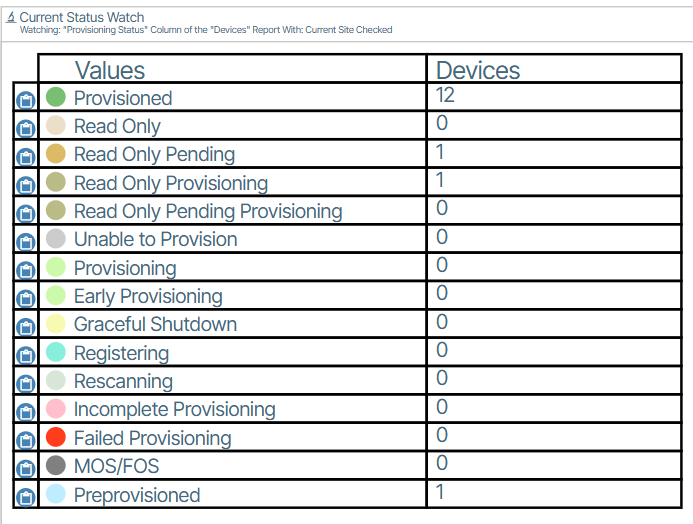
| Color | Status | Meaning |
|---|---|---|
 (Green / #79BF71) (Green / #79BF71) |
Provisioned | Provisioning is considered OK, with no detected pending work or overriding provisioning condition. |
 (Green / #CDF9AA) (Green / #CDF9AA) |
Provisioning | Configuration work is pending or in progress: desired and current provisioning versions differ, pending changes are detected, or the controller/switch reports configuring. |
 (Light green / #CDF9AA) (Light green / #CDF9AA) |
Early Provisioning | The GUI anticipates pending provisioning and temporarily replaces an otherwise Provisioned status before the normal status catches up. |
 (Yellow / #F8FAB1) (Yellow / #F8FAB1) |
Graceful Shutdown | The switch's graceful-shutdown workflow has started. The implementation selects this when the reported state is present and is not not-started. |
 (Teal / #8EDDDD) (Teal / #8EDDDD) |
Registering | The device is registering and is not yet available; readable port definitions are not yet present. |
 (Gray / #D8E6D8) (Gray / #D8E6D8) |
Rescanning | The device is being rescanned. |
 (Pink / #FFC0CB) (Pink / #FFC0CB) |
Incomplete Provisioning | Required provisioning setup is missing or inconsistent—for example, a missing endpoint, a missing device bundle, an invalid topology association, or conflicting port assignments. |
 (Red / #FF3D1D) (Red / #FF3D1D) |
Failed Provisioning | A provisioning error or switch/controller failure has been reported. The tooltip provides the specific failure. |
 (Grey / #CCCCCC) (Grey / #CCCCCC) |
Unable to Provision | Provisioning cannot currently proceed—for example, because communication is unavailable, synchronization or registration data is missing, or an upstream dependency is unavailable. |
 (Teal / #BDEDFF) (Teal / #BDEDFF) |
Preprovisioned | Configuration exists for a placeholder/mock device before the real device is present. |
 (Pale yellow / #F4F395) (Pale yellow / #F4F395) |
Initializing Switch | The switch-management status reports initial upload or agent started. |
 (Beige / #EBDFCA) (Beige / #EBDFCA) |
Read Only | Read-only mode prevents configuration writes to the switch; no pending-change flag is present. |
 (Brown-Orange / #DDBB66) (Brown-Orange / #DDBB66) |
Read Only Pending | Read-only mode is enabled and pending changes are recorded. |
 (Light Brown / #BBBB88) (Light Brown / #BBBB88) |
Read Only Provisioning | Read-only mode is enabled while the provisioning logic detects pending/in-progress work; the separate pending-change flag is absent. The label does not by itself mean writes are permitted. |
 (Muted khaki / #BBBB88) (Muted khaki / #BBBB88) |
Read Only Pending Provisioning | The same read-only provisioning condition, with the pending-change flag also present. |
 (Gray / #808080) (Gray / #808080) |
Maintenance Out of Service (MOS) / Fault out of Service (FOS) | Device is out of service. |
Topology Device Status🔗
These colors apply without selection, highlighting, or other display overrides.
| Color | Status | Meaning |
|---|---|---|
 (Near-white / #F8FFFF) (Near-white / #F8FFFF) |
Provisioned / normal device | Default background for physical hardware. A Provisioned state retains this fill; the green status indicator is separate. |
 (Light blue / #BDEDFF) (Light blue / #BDEDFF) |
Preprovisioned / No Device / mock device | A placeholder stands in for expected hardware that is not yet present. Also used for preprovisioned endpoints. |
 (Yellow-green / #DDF9AA) (Yellow-green / #DDF9AA) |
Provisioning | Configuration work is pending or in progress. |
 (Yellow-green / #DDF9AA) (Yellow-green / #DDF9AA) |
Early Provisioning | The GUI anticipates pending provisioning before the normal provisioning status catches up. |
 (Pale yellow / #F8FAB1) (Pale yellow / #F8FAB1) |
Graceful Shutdown | The switch's graceful-shutdown workflow has started. |
 (Mint green / #88EEDD) (Mint green / #88EEDD) |
Registering | Registration is in progress and normal provisioning is not yet available; readable port definitions are not yet present. |
 (Muted light green / #C1D69A) (Muted light green / #C1D69A) |
Rescanning | A rescan is in progress. |
 (Pink / #FFC0CB) (Pink / #FFC0CB) |
Incomplete Provisioning | Required configuration is missing or inconsistent—for example, a missing endpoint or conflicting provisioning assignments. |
 (Light red / #FF6666) (Light red / #FF6666) |
Failed Provisioning | A provisioning error or switch/controller failure has been reported. |
 (Very light gray / #E8E8E8) (Very light gray / #E8E8E8) |
Unable to Provision / Upstream Fabric Port Down | Provisioning cannot proceed, or an upstream connection is unavailable. The tooltip identifies the cause. |
 (Gray / #BBBBBB) (Gray / #BBBBBB) |
MOS/FOS | Marked out of service, or forced out of service by an upstream condition. |
 (Pale yellow / #F4F395) (Pale yellow / #F4F395) |
Initializing Switch | Switch-management status reports initial upload or agent startup. |
 (Pale beige / #EBDFCA) (Pale beige / #EBDFCA) |
Read Only | Read-only mode prevents configuration writes; no pending-change flag is present. |
 (Tan / #DDBB66) (Tan / #DDBB66) |
Read Only Pending | Read-only mode is enabled and pending changes are recorded. |
 (Muted khaki / #BBBB88) (Muted khaki / #BBBB88) |
Read Only Provisioning | Provisioning work is detected while read-only mode is enabled; the separate pending-change flag is absent. |
 (Muted khaki / #BBBB88) (Muted khaki / #BBBB88) |
Read Only Pending Provisioning | Provisioning work is detected while read-only mode is enabled, and the pending-change flag is present. |
 (Salmon pink / #FFA0A0) (Salmon pink / #FFA0A0) |
Switch without an endpoint | A real switch is not associated with a switch endpoint. This has its own color rather than the ordinary Incomplete Provisioning pink. |
 (Pink / #FFC0CB) (Pink / #FFC0CB) |
Licensing restriction | Styling for a placeholder that cannot be licensed under the applicable endpoint-tier check. This is distinct from Incomplete Provisioning despite sharing its color. |
 (Blue / #A7DCFF) (Blue / #A7DCFF) |
Unmanaged device / unmanaged external gateway | Attached unmanaged hardware or a gateway is drawn through the discovery/link-status path. |
 (Blue-gray / #DAE0E4) (Blue-gray / #DAE0E4) |
Previously discovered unmanaged device, link down | Disabled styling is applied when discovery information exists but the link is down. |