Verity API🔗
Verity API is a REST API conforming to the OpenAPI 3.0 specification used for operating a Verity instance.
The Verity API provides developers with access to essential functionality for interacting with data and services within the Verity system. Users can leverage this API to authenticate users, retrieve user information, and manage overlay resources efficiently. With the Verity API, developers can seamlessly integrate Verity's robust features into their applications, enhancing user experiences and streamlining workflows.
API Documentation Versioning
The following documentation provides a high level explanation of how the Verity API functions. For detailed examples and API reference for your exact version of Verity, refer to the Swagger documentation page on your Verity server.
API Documentation🔗
- Navigate to
/swaggeron your Verity server IP. Example:https://vnc-datacenter.company.net/swagger - On this page, in the top left corner, is a link to the schema file if you wish to download it. To download a JSON copy of the API specification right-click on swagger.json and choose Save-As.
Security and Safe Use🔗
- Transport: The API is served by the vNetC over HTTPS (port 443) with the TLS settings described in HTTPS and Server Web Certificates. Install a valid certificate for the vNetC FQDN and keep certificate verification enabled in API clients and scripts. In lockdown mode, API clients must also present a client certificate.
- Accounts: Authenticate with a dedicated account that has only the role the integration needs (see Users).
- Secrets: Treat passwords and access tokens as secrets. Store them in a secrets manager rather than in scripts or source control, and do not write them to logs. Tokens expire 30 minutes after they are issued.
- Testing: Develop and test API automation against a non-production Verity instance. The Swagger page on your server documents the request and response schemas for your release; check the HTTP status code of every response.
- Changes: Before you commit a changeset on a production system, review it with Compare to Current and create a Time Traveler backup so that you can restore the previous intended state if needed.
Quickstart🔗
There are two endpoints you need to understand before using the API in production:
1. Authorization Endpoint🔗
The Authorization section of the Verity API allows users to send their user/password combination to Verity for the creation of a time-limited access token. Once this token is retrieved, all further API access needs to use the token.
Create an Auth Token🔗
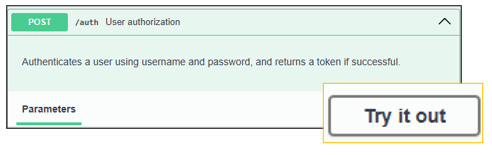
- Go to Authorization and click the drop down menu.

- Click Try it out.
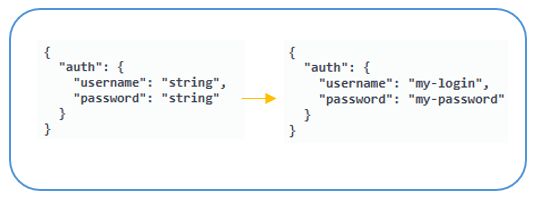
- In the request body, type the username and password credentials replacing the default string text.
- Click the Execute button to invoke the HTTP request.

- If successful, the action returns a 200 status code with a description of Successful authorization. The token is required for requests and expires in 30 minutes. The Authorization drop down menu does not need to remain open and can be closed.
2. Changesets Endpoint🔗
Create a Changeset🔗
To use a changeset, users must first create the changeset via POST/changesets .
- Go to
POST/changesets. - Unfold the field and click Try it out.
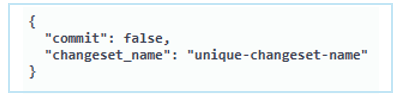
- To create a new changeset, the commit must be set to false, and the changeset_name must be set to a unique name.
Changeset Naming
Creating a changeset with the same name as a pre-existing changeset will return an error.
Commit a Changeset🔗
- To commit a changeset to the system, the commit field must be set to true, and the changeset_name must be set to the changeset the user wants to commit.
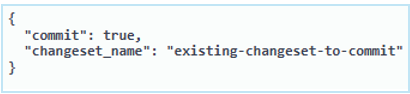
- Click the Execute button.
Verity Changesets (UI)🔗
Changesets are listed within the UI at Operations -> Change Sets. 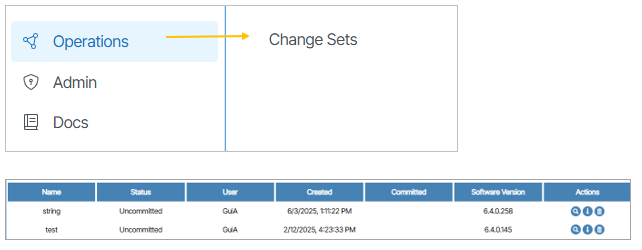
Changeset Actions (UI)🔗
-
Compare to Current: Compares the changes in the changeset to the current system state in the form of a tabular summary.
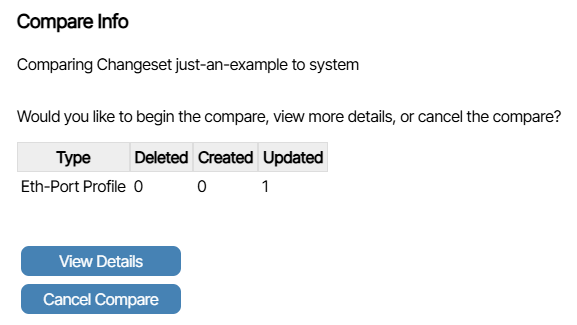 Clicking View Details provides more detailed information in the form of a Report.
-
Download: Downloads a JSON file of the affected object(s) to the user's machine.
External Integrations🔗
Customers are free to develop their own integrations and plugins that make use of the Verity API. A number of prebuilt options are available: